

What should an AI teaching assistant knowledge check reveal?
How do you build knowledge checks into a lesson?
Example you can copy: a Grade 9 science knowledge check
What our teachers ask for in lesson support
How Resso supports teacher-defined knowledge checks
What results should you track?
AI teaching assistant knowledge checks work best when students explain an idea, receive focused feedback, and apply it to a new example. Teachers define what counts as understanding and review the evidence before deciding what to teach next.
You’ve just explained Newton’s third law to 30 ninth graders. Several nod. One asks whether the two forces cancel each other out. There’s the question you need to hear. A short conversation can bring that misunderstanding into view while there’s still time to address it.
Here’s a practical routine you can use within a lesson, with a science scenario, questions, and criteria you can copy.
What should an AI teaching assistant knowledge check reveal?
A useful knowledge check reveals whether a student can explain, apply, and question an idea in their own words. Completing the conversation gives you participation evidence; the content of the response tells you more about learning.
Teachers we work with tell us they want to hear students explain their thinking, especially when polished written work makes understanding hard to judge. That’s the need behind our broader guide to oral assessment in the age of generative AI. A lesson knowledge check uses a smaller version of that approach: one learning goal and a short opportunity to explain it.
“Do you understand?” rarely gives you enough detail. A multiple-choice question can identify a wrong answer, but you may still need to ask why the student chose it. A long, open-ended AI conversation can also drift beyond the lesson or explain so much that the student has little thinking left to do.
Plan three things to listen for: an accurate explanation, a reason that supports it, and an application to an unfamiliar example. Those give you a clearer basis for feedback.
How do you build knowledge checks into a lesson?
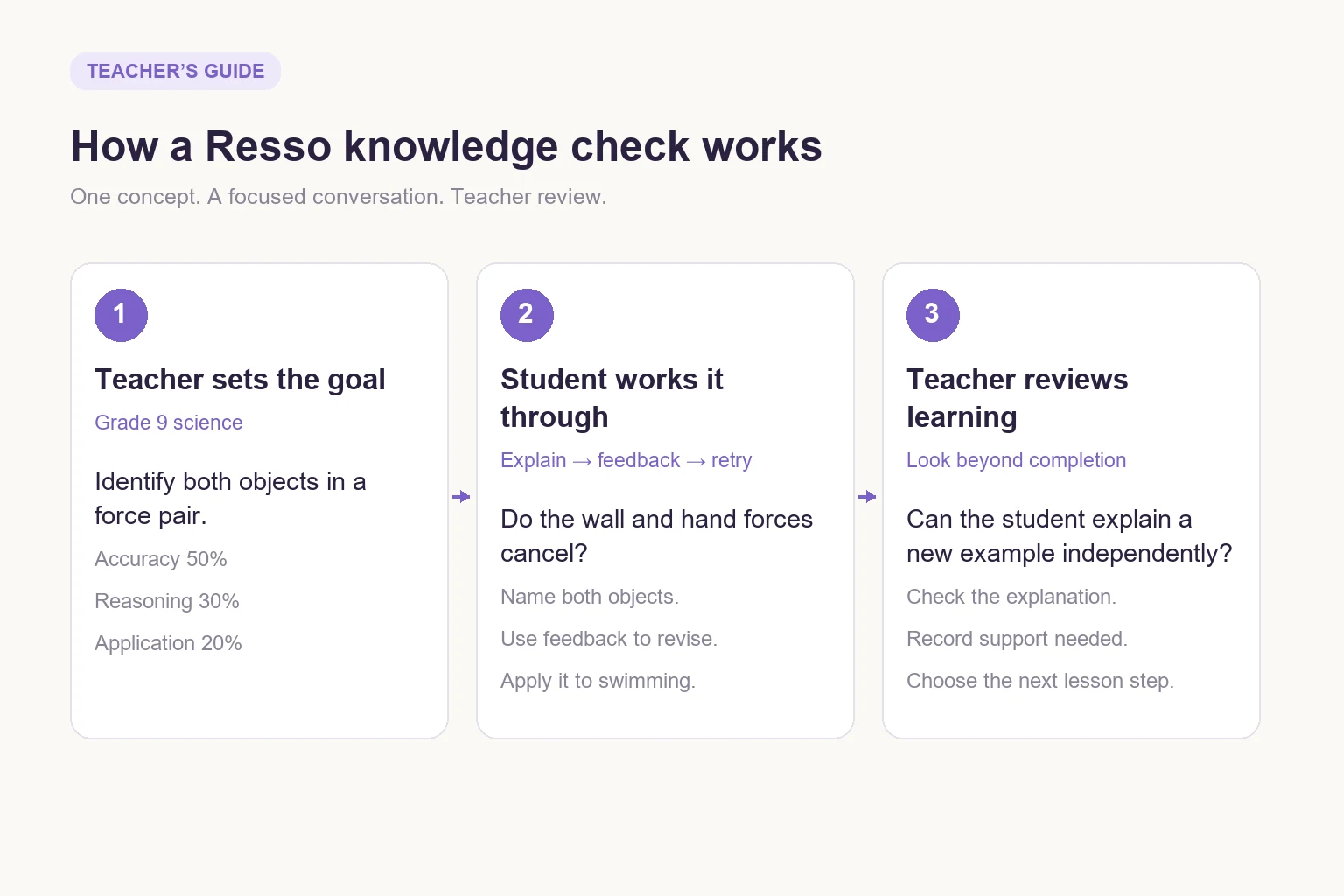
Build a short explain–feedback–retry–transfer routine around one learning goal. You can use it in a teacher-led conversation, a partner activity, or an AI teaching assistant scenario.
- Choose one idea. Write what students should be able to explain by the end. “Identify the two objects in a Newton’s third-law force pair” is easier to check than “understand forces.”
- Ask for an initial explanation. Use a concrete situation and one question at a time. Give students room to think before offering a hint. Our guide to questions that reveal student reasoning offers more ways to shape these prompts.
- Respond to the specific gap. If the student names only one object, ask them to identify the other. If they’re stuck, explain the missing idea and work through an example together.
- Invite a focused retry. Ask the student to improve the part they just discussed. Keep the feedback small enough to use immediately.
- Change the situation. Use a new example to see whether the idea transfers. A correct answer after a hint and a correct independent answer tell you different things.
For a first classroom trial, allow about 5–8 minutes for this routine, then adjust after trying it yourself. That’s a planning estimate, not a measured Resso completion time. Keep the activity formative so students can ask questions and make mistakes without every attempt becoming a grade.
Example you can copy: a Grade 9 science knowledge check
This scenario checks whether students can identify a force pair and explain why equal and opposite forces do not cancel on one object. Use it after teaching Newton’s third law.
| Setting | Value |
|---|---|
| Scenario | Explain what happens when you push against a wall, then apply the same idea to swimming. |
| Learning goal | Identify both interacting objects, name the force on each, and explain that the forces act on different objects. |
| Student introduction | We’ll explore one idea about forces. Explain your thinking, ask questions, and revise your answer after feedback. |
| Questions | 1. When your hand pushes the wall, which two objects interact? 2. Describe the force on each object. 3. A student says these forces cancel because they are equal and opposite. What would you explain? 4. How does pushing water backward help a swimmer move forward? |
| Ideal response | The hand pushes on the wall, and the wall pushes on the hand with an equal-magnitude force in the opposite direction. These forces act on different objects, so they do not cancel within the net force on either object. A swimmer pushes water backward; the water pushes the swimmer forward. |
| Practice criteria | Scientific accuracy: 50% · Explanation of the force pair: 30% · Application to the new example: 20%. |
| Suggested review threshold | 70/100, plus a correct explanation that the paired forces act on different objects. The teacher reviews both conditions. |
The numbers above are example settings for this activity. They’re not student results or a universal passing standard. Adjust them to your curriculum and class.
For the initial wall example, a useful hint is: “Name the object receiving each force.” If the student still thinks the forces cancel, explain the distinction and invite a retry. Keep the swimming example for a later check without that hint, so you can see what the student can apply independently.
NASA’s explanation of Newton’s third law is a helpful reference when checking the science in your scenario. Preview the assistant’s responses against your own materials before assigning it.
Score the science you’re teaching. Accent, confidence, response speed, and filler words should not determine whether a student understands a force pair. Our oral assessment rubric guide explains how to keep criteria focused on the intended learning.
What our teachers ask for in lesson support
Our teachers ask for tools that make student thinking easier to see and help them decide where to focus their attention. That means the lesson, questions, and criteria need to reflect what they actually taught.
When we introduced lesson support and the Teaching Assistant, teachers we work with asked when they could get access. They also asked for class-level analytics to see who needs support. Those two feedback themes belong together: students need a place to work through an idea, and teachers need a useful view of where the difficulty remains.
A good review question is simple: “Which concept should I explain again tomorrow?” Look for a pattern across responses, then check a few examples yourself before planning the next lesson.
How Resso supports teacher-defined knowledge checks
Resso’s Teacher’s Assistant supports guided practice conversations built around your materials, goals, and criteria. You can use that structure to give students a place to explain a lesson concept and receive feedback.
Start with the Teacher’s Assistant scenario type. Its current feature page describes tutoring-style prompts, check-ins, custom scenarios, and individual and class-level analytics. Build your explanation-and-retry routine around the lesson content you want students to learn.
Use Full Question Control to add, edit, and order the questions. Keep the initial explanation before the transfer example. Then use Editable Evaluation Criteria to align the first-pass feedback with scientific accuracy, reasoning, and application.
Preview the scenario as a learner. Try a correct answer, the “forces cancel” misconception, and a request for help. Refine the instructions if the conversation gives away the answer too early or misses the misconception. After assigning it, use the dashboard and attempt history to identify responses that need your attention.
The school boards we work with in Ontario use Resso for speaking practice and assessment. For a lesson knowledge check, start with one goal and expand after reviewing how the activity works for your class.
What results should you track?
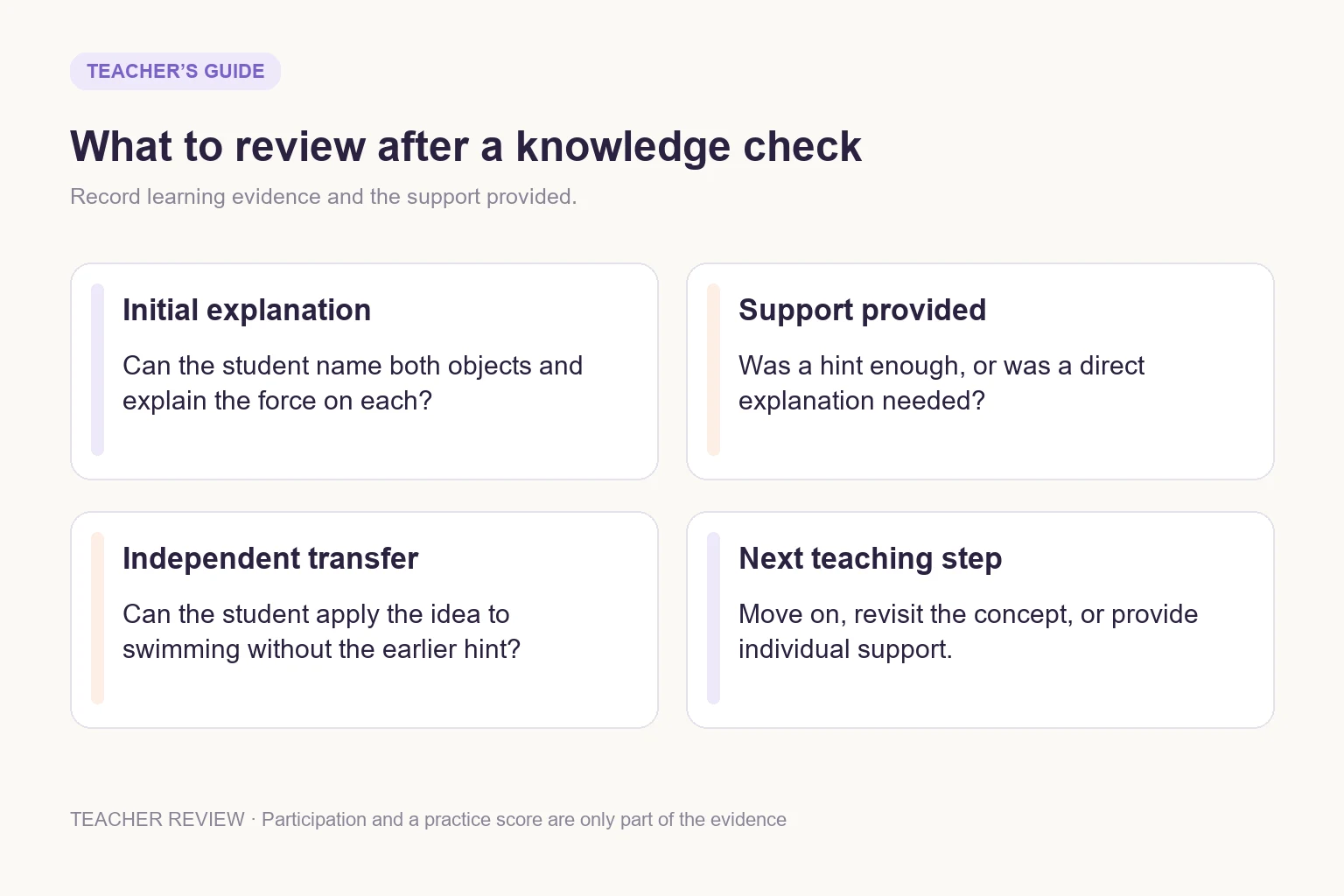
Track what students explain, how much support they need, and whether they can apply the idea independently. A higher practice score is useful feedback, but you still need to examine the explanation behind it.
| Metric | What to record | Teaching decision it supports |
|---|---|---|
| Initial understanding | Can the student identify both objects and the force on each? | Where to begin the feedback. |
| Support needed | Did the student need a hint, an explanation, or a worked example? | Which concept needs more instruction. |
| Independent transfer | Can the student explain the swimming example without the earlier hint? | Whether to move on or revisit the idea. |
| Participation and teacher time | Who completed the activity, who could not access it, and how long setup and review took. | Whether the routine fits your classroom. |
For a longer pilot, compare a baseline with a comparable final task and include educator review. Our guide to measuring oral assessment reliability, fairness, and learning impact explains how to make those comparisons useful.
Privacy and teacher control for K–12 classrooms
Use your school’s approved setup, explain the activity to students, and keep educators responsible for learning decisions. Resso’s published features include data privacy and deletion controls, SSO and role-based access, and no stored video recordings. Student data is not used to train AI.
Set the grade level, topic boundaries, questions, and criteria before assigning the conversation. Use fictional examples rather than identifiable student details. Check device access and existing accommodations, and offer an appropriate alternative when spoken practice is unsuitable.
The University of Toronto’s guidance on teaching with generative AI emphasizes verifying outputs and using institutionally approved tools. Apply your own school’s policies, and review AI feedback before using it in a consequential assessment decision.
Frequently asked questions
Can I use an AI teaching assistant during a lesson?
Yes, if the tool is approved for your setting and the activity fits your learning goal. Place the check after a short explanation or demonstration, and review a sample of responses before planning the next step.
How many questions should a knowledge check include?
Start with 3–5 questions around one concept. Give each a purpose, such as explanation, misconception checking, or transfer, and shorten the activity if students are repeating the same reasoning.
What should the assistant do when a student is wrong?
It should address the specific misunderstanding, offer an appropriate hint or explanation, and invite another attempt. It should also allow student questions; a learning conversation needs room for teaching as well as checking.
Should every attempt count toward a grade?
For this routine, keep attempts formative and use them to guide feedback. If you later use a response for grading, tell students the conditions and criteria in advance and review it yourself.
How do I know the student understood the feedback?
Ask the student to apply the idea to a changed example without the same hint. Compare the reasoning, then use a brief teacher follow-up when the answer is ambiguous.
Try one knowledge check in your next lesson
Choose a concept students often misunderstand and build one explain–feedback–retry–transfer sequence around it. Resso’s education platform brings scenario setup, spoken practice, feedback, and analytics into that routine.
Get a free oral assessment scenario or Book a 30-minute demo with our team. Bring one learning goal, and we can explore how it could work as a Teacher’s Assistant knowledge check.
Related reading: